Roborear

ESP32 Camera Comparison: ESP32-CAM vs. XIAO ESP32-S3 Sense vs. DFRobot DFR1154

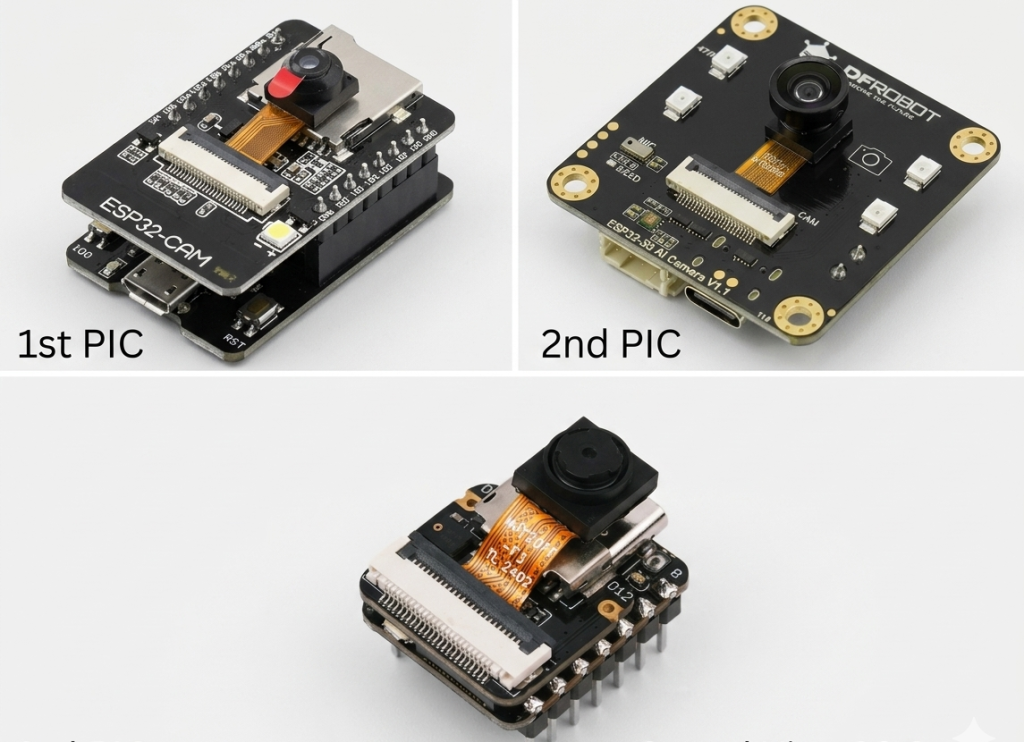
Gemini Generated Image nxenpsnxenpsnxen e1779644294346

The “Which Camera Should I Buy?” Problem

I’ve been down this rabbit hole more times than I’d like to admit.

You want to build a smart camera. Maybe a security system. Maybe a robot that sees. Maybe a face recognition doorbell.

But which board do you buy – ESP32 Camera Comparison? 

The classic ESP32-CAM is cheap and everywhere. The Seeed Studio XIAO ESP32-S3 Sense is tiny and powerful. The DFRobot DFR1154 is feature-packed with night vision and audio.

I’ve tested all three. Hours of flashing. Countless debug sessions. A few moments of genuine frustration.

Now I’m going to tell you exactly which one you should buy.

Untitled design 21

The Contenders


BoardPrice (USD)Key FeatureBest For
ESP32-CAM$8-12Cheap, widely availableBasic streaming, budget projects
XIAO ESP32-S3 Sense$15-20Ultra-compact, PSRAM, Seeed ecosystemWearables, tight spaces
DFRobot DFR1154$25-35Night vision, mic, speaker, ampAll-in-one AI, voice interaction

Let’s break down each one.

Round 1: ESP32-CAM – The Classic Workhorse

What It Is

The ESP32-CAM is the OG budget camera module. An ESP32 chip, an OV2640 camera, a microSD slot, and a few GPIO pins. That’s it. No frills.

Specifications


FeatureSpec
ProcessorESP32 (dual-core, 240 MHz)
PSRAM4MB
CameraOV2640 (2MP, 1600×1200)
Audio❌ None
Night Vision❌ None
USBMicro-USB (needs FTDI programmer)
Dimensions27×40.5mm
Price$8-12

The Good

It’s ridiculously cheap. At $8-12, you can buy three for the price of one DFR1154.

Huge community support. Every problem you’ll encounter has been solved and posted on a forum somewhere.

Simple to get started. Flash the CameraWebServer example, enter your WiFi credentials, and you’re streaming in minutes.

4MB PSRAM is enough for basic streaming. For 99% of hobby projects, you don’t need more.

Screenshot 2026 05 24 234212

The Bad

No USB programming. You need an external FTDI programmer. That’s an extra $5-10 and more wires to manage.

The FTDI connection is finicky. You have to connect GPIO 0 to GND to upload code. Every. Single. Time.

No onboard audio. Want sound? Add an external microphone and speaker module.

No night vision. The OV2640 sensor isn’t IR-sensitive.

The image quality is decent but not great. It works. It’s not winning any photography awards.

The Verdict

The ESP32-CAM is perfect for:

  • Learning camera basics without breaking the bank

  • Projects where price is the #1 concern

  • Simple streaming to a web browser

Skip it if you need audio, night vision, or a compact form factor.

Round 2: Seeed Studio XIAO ESP32-S3 Sense – The Tiny Powerhouse

What It Is

The XIAO ESP32-S3 Sense is Seeed Studio’s ultra-compact camera module. It’s part of their “XIAO” family – tiny development boards with big capabilities.

Specifications


FeatureSpec
ProcessorESP32-S3 (dual-core, 240 MHz)
PSRAM8MB
CameraOV2640 (or OV5640 optional)
Audio❌ None (needs expansion)
Night Vision❌ None
USBUSB-C (native programming)
Dimensions21×17.8mm (insanely small)
Price$15-20

Screenshot 2026 05 24 234329

The Good

It’s incredibly small. At 21×18mm, this is the smallest ESP32 camera module available. It fits anywhere.

USB-C programming. No FTDI adapter needed. Just plug and upload.

8MB PSRAM – double the ESP32-CAM. This matters for AI models and high-res images.

The Seeed ecosystem is excellent. Grove connectors, expansion boards, and great documentation.

ESP32-S3 chip means better AI acceleration (vector instructions) than the classic ESP32.

The Bad

No onboard audio. Like the ESP32-CAM, you’ll need external modules for sound.

No night vision. Same OV2640 sensor as the classic.

The camera connector is fragile. It’s a small ribbon cable that can break if you’re not careful.

Limited GPIO breakout. The XIAO form factor means fewer pins accessible compared to the DFR1154.

Smaller community than ESP32-CAM. You’ll find help, but not as much.

The Verdict

The XIAO ESP32-S3 Sense is perfect for:

  • Wearable projects (space is at a premium)

  • Applications where size matters more than features

  • Building portable camera systems

Skip it if you need audio, night vision, or easy expansion.

Round 3: DFRobot DFR1154 – The All-in-One AI Camera

What It Is

The DFRobot DFR1154 is a complete edge AI sensor hub. It has a camera, microphone, speaker amplifier, night vision, and an ambient light sensor – all on one board.

Specifications


FeatureSpec
ProcessorESP32-S3 (dual-core, 240 MHz)
PSRAM8MB
Flash16MB
CameraOV3660 (2MP, 160° wide angle)
Audio✅ I2S PDM microphone + MAX98357 amplifier
Night Vision✅ IR LEDs + ambient light sensor
USBUSB-C (native programming)
Dimensions42×42mm
Price$25-35
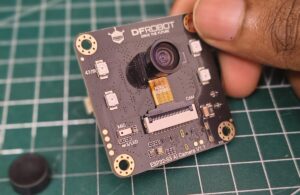
A close-up view of a person holding the DFRobot ESP32 S3 AI Camera V1.1 development board over a green cutting mat. The black PCB features a central camera sensor labeled OV3660 attached via a ribbon cable, surrounding IR/LED lights, a built-in microphone, and mounting holes.
Say hello to your next edge AI project! 🤖📸 This is the DFRobot ESP32-S3 AI Camera V1.1, packed with an OV3660 camera sensor, built-in mic, and onboard LEDs. If you are looking to build low-cost face recognition, object tracking, or smart home automation, this tiny board packs a massive punch.

The Good

Everything is onboard. Camera. Mic. Speaker amp. Night vision. IR LEDs. Light sensor. This is a complete system.

OV3660 camera is better than OV2640. Higher resolution, better low-light performance, and supports more professional embedded applications .

160° wide-angle lens captures more of the scene.

Night vision works in complete darkness using IR LEDs .

Built-in microphone and speaker amplifier mean you can build voice assistants and interactive systems without extra hardware .

Edge Impulse, YOLO, and OpenCV support for AI models .

Can integrate with ChatGPT for voice-controlled AI assistants .

Gravity connector for easy sensor expansion.

The Bad

The Gravity connector is confusing. It’s UART-only, not I2C, which limits what sensors you can attach . Multiple users have reported this confusion.

Known WiFi sensitivity issue. Some units have trouble connecting to certain routers unless you set your 2.4GHz channel to 1 .

Setup is more complex. You’ll need to downgrade your ESP32 board package to version 2.0.17 for audio libraries to work.

Serial monitor requires a USB-to-TTL adapter connected to the Gravity port . The USB-C port is for programming only.

Physically larger – 42×42mm won’t fit in tiny enclosures.

Higher price. At $25-35, it’s the most expensive of the three.

The Verdict

The DFRobot DFR1154 is perfect for:

  • All-in-one security cameras (night vision + audio)

  • Voice-activated smart assistants

  • Edge AI projects running locally

  • Applications where you want a complete system without extra modules

Skip it if you need ultra-compact size or want to keep costs minimal.

Head-to-Head Comparison


FeatureESP32-CAMXIAO ESP32-S3 SenseDFRobot DFR1154
ProcessorESP32ESP32-S3ESP32-S3
PSRAM4MB8MB8MB
Flash4MB8MB16MB
Camera SensorOV2640OV2640OV3660
Camera FOV~66°~66°160°
Night Vision✅ (IR LEDs + ALS)
Microphone✅ (I2S PDM)
Speaker Amp✅ (MAX98357)
USB Programming❌ (needs FTDI)✅ (USB-C)✅ (USB-C)
Dimensions27×40.5mm21×17.8mm42×42mm
Price (USD)$8-12$15-20$25-35

Which One Should You Buy?

Buy the ESP32-CAM if:


Your PriorityWhy
BudgetIt’s the cheapest. Buy three for the price of one DFR1154.
LearningYou’re new to ESP32 cameras and want something simple.
Basic streamingYou just need a live feed in a browser.
Large communityEvery problem has been solved before.

Best for: RC car FPV, simple security camera, learning projects.


Buy the XIAO ESP32-S3 Sense if:


Your PriorityWhy
SizeIt’s tiny. Fits anywhere.
PortabilityWearables, drones, tight spaces.
ESP32-S3You want the newer chip and 8MB PSRAM.
USB-CYou hate FTDI adapters.

Best for: Wearable cameras, drones, portable AI projects, tight enclosures.


Buy the DFRobot DFR1154 if:


Your PriorityWhy
All-in-oneYou don’t want to add external mic/speaker/IR modules.
Night visionYou need 24/7 monitoring in darkness.
Voice interactionYou’re building a smart assistant or voice-controlled system.
Edge AIYou want to run models locally without the cloud .
Wide-angleYou need to see more of the scene (160° vs 66°).

Best for: AI doorbells, baby monitors with cry detection, smart assistants, license plate recognition

Cost Breakdown (USD)


ComponentESP32-CAMXIAO ESP32-S3 SenseDFRobot DFR1154
Board$8-12$15-20$25-35
FTDI Programmer (if needed)$5-10$0$0
MicroSD Card (optional)$5-10$5-10$5-10
External Mic/Speaker (if needed)$10-15$10-15$0
Total$18-37$15-30$25-35

The DFR1154’s all-in-one design actually makes it competitive when you factor in the cost of adding external modules to the other boards.


Community Support & Learning Resources

All three boards are supported by ESP32’s large developer community. However, the DFR1154 benefits from DFRobot’s wiki, tutorials, and extensive sample code . With a decade of experience, DFRobot makes it easy to find examples for AI and voice projects.

For the XIAO Sense, Seeed Studio provides similar resources, including tutorials on using the OV5640 camera sensor and integrating with their Grove ecosystem.


What I’m Building Next

I’m currently using the DFRobot DFR1154 for a smart doorbell project. The onboard mic and speaker mean I can add two-way audio without extra hardware. The IR LEDs let it see visitors at night. And the wide-angle lens captures the whole porch.

The ESP32-CAM still has a place in my toolbox – it’s my go-to for quick prototypes. The XIAO Sense is perfect for a wearable camera I’m designing.

Each board has its purpose. Choose the one that fits your project, not the one with the most features.

FAQs

Leave a Comment

Your email address will not be published. Required fields are marked *

Scroll to Top