Roborear

AI Security Camera with Night Vision: I Built a Smart Intruder Alert That Works in Complete Darkness

Your paragraph text 3

The “It Saw in Pitch Black” Moment

I turned off all the lights.

Complete darkness. Couldn’t see my hand in front of my face.

Then I triggered the camera.

A few seconds later, my phone buzzed. A photo appeared in my Telegram inbox. The image showed my room – clearly visible, illuminated by invisible infrared light.

The AI analyzed the image and reported: “Room appears empty. No persons detected. Security status: Normal.”

My security camera just saw in the dark. And it understood what it was seeing.

That’s when I realized: this isn’t just a camera. It’s an intelligent security system that never sleeps, never blinks, and can see in total darkness.

And I built it myself.

What Makes This Security Camera Different

Most DIY security cameras just stream video. You have to watch the feed yourself. Or they record to an SD card and you check it later.

This camera does something different.


FeatureWhat It Does
Ambient Light SensorDetects when lights turn on/off
IR Night VisionSees in complete darkness (invisible to human eyes)
AI-Powered AnalysisSends images to GPT-4o-mini for intelligent description
Telegram AlertsSends photo + AI analysis directly to your phone
Autonomous OperationRuns 24/7 without any input from you

How it works:

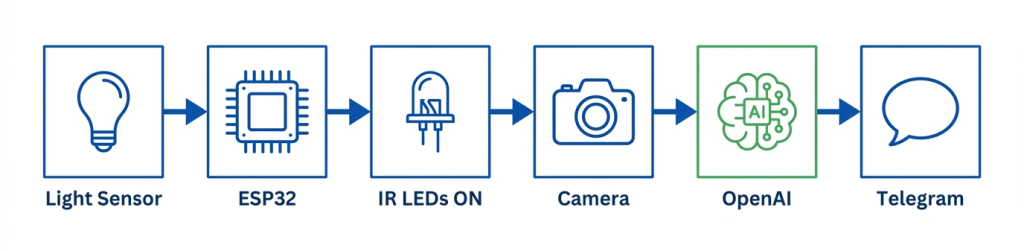
  1. Ambient light sensor monitors your room (checks every 3 seconds)

  2. When light changes significantly (>40%), it triggers

  3. If dark, IR LEDs turn on BEFORE capturing (critical!)

  4. Camera captures image

  5. Image sent to Telegram + OpenAI for analysis

  6. AI describes what it sees (persons, suspicious activity, security status)

Gemini Generated Image ifvc15ifvc15ifvc e1779780069639

Why I Built This (The Real Story)

I live in a shared apartment. People come and go. Sometimes things get moved. Once, a package went missing.

I wanted a security camera, but I didn’t want:

  • Cloud subscriptions ($5-10/month forever)

  • Privacy concerns (my footage on someone else’s server)

  • Expensive hardware ($100+ for “smart” cameras)

  • False alarms from motion sensors (curtains moving, pets, shadows)

So I built my own. Total cost? About $35. No monthly fees. My data, my control.

And I learned how AI vision actually works in the process.

DFRobot ESP32-S3 AI Camera: The Board That Does It All

Before we dive into the code, let me introduce the star of this project: the DFRobot ESP32-S3 AI Camera (DFR1154) .

This isn’t just another ESP32-CAM. It’s a complete edge AI sensor hub with everything you need for advanced computer vision projects.

IR Sensor

Full Feature Breakdown


FeatureSpecificationWhy It Matters for This Project
ProcessorESP32-S3 (dual-core, 240 MHz)Handles Wi-Fi, camera, light sensor, and AI calls simultaneously
PSRAM8MB Octal PSRAMEssential for capturing high-res images without crashing
Flash16MBPlenty of space for code and future features
Camera SensorOV3660 (2MP)Better low-light performance than standard OV2640
Camera FOV160° wide angleCaptures entire room – no blind spots
IR LEDs4x 940nm infraredInvisible night vision – humans can’t see it, camera can
Ambient Light SensorLTR-308 (I2C)Detects when lights turn on/off – our trigger
Onboard LEDGPIO 3Visual status indicator
USBUSB-CModern connector, no FTDI programmer needed
Battery ConnectorJST (PH2.0)Optional battery power for portable use
Dimensions42×42mmCompact enough to hide anywhere

Gemini Generated Image nxenpsnxenpsnxen e1779644294346

What Makes This Board Special

1. Built-in Night Vision (No Extra Hardware!)

Most ESP32 camera boards require external IR LEDs and a separate light sensor. This board has both built-in. The four IR LEDs emit 940nm infrared light – completely invisible to human eyes but perfectly visible to the camera sensor.

2. Ambient Light Sensor on I2C

The LTR-308 light sensor lets the board know when the environment gets dark. This is what triggers our night vision activation. No external wiring needed – it’s already on the board.

3. OV3660 > OV2640

The OV3660 sensor is a significant upgrade over the common OV2640 found on cheap ESP32-CAM modules. It offers:

  • Better low-light sensitivity (critical for night vision)

  • Higher dynamic range

  • Improved color accuracy

4. USB-C with Native USB

No more hunting for FTDI programmers. Just plug in a USB-C cable and upload code. The ESP32-S3’s native USB support makes programming simple.

5. ESP32-S3 AI Acceleration

The ESP32-S3 has vector instructions specifically designed to accelerate machine learning tasks. While we’re using cloud AI in this project, the same board can run TinyML models locally.

Screenshot 2026 05 26 133452

Board Pinout (What You Need to Know)


PinFunctionUsed In This Project
GPIO 3Onboard LEDStatus indicator (blinks when processing)
GPIO 47IR LED controlTurns night vision on/off
I2C (GPIO 8/9)Light sensorReads ambient light level
USBProgramming & powerUpload code and power the board

Why Not Use a Regular ESP32-CAM?


FeatureESP32-CAMDFRobot DFR1154
Night vision❌ Requires external IR LEDs + transistor✅ Built-in IR LEDs
Light sensor❌ Requires external sensor✅ Built-in LTR-308
USB programming❌ Needs FTDI adapter✅ USB-C native
PSRAM4MB (often less)8MB
CameraOV2640OV3660 (better low-light)
Price~$10~$25-35

The ESP32-CAM is great for basic streaming. But for an intelligent night vision security camera? The DFR1154 is worth every extra dollar.

What’s NOT Built-In (Honest Truth)

No board is perfect. Here’s what you still need to add:


Missing FeatureSolution
MicrophoneNot needed for this project (but available on I2S pins)
SpeakerNot needed for this project (but available on I2S pins)
SD card slotNot needed – images go directly to Telegram
Battery charging circuitUse TP4056 module if going portable

For this security camera project, the board has everything we need. No soldering, no extra modules – just the board, power, and Wi-Fi.
The Hardware: DFRobot ESP32-S3 AI Camera

This project uses the DFRobot ESP32-S3 AI Camera (DFR1154) – an all-in-one board with everything built-in.


ComponentSpecs
ProcessorESP32-S3 (dual-core, 240 MHz)
PSRAM8MB (for AI models and image buffering)
CameraOV3660 (2MP, 160° wide angle)
Light SensorLTR-308 ambient light sensor (I2C)
Night VisionIR LEDs (940nm, invisible to human eye)
ConnectivityWi-Fi 2.4GHz + BLE 5.0
Price~$25-35

The best part? No external wiring for night vision. No separate light sensor module. No SD card required (images go directly to Telegram). Everything is on one board.

Complete Parts List


ComponentApprox Price (USD)Notes
DFRobot ESP32-S3 AI Camera [Click Here to Buy]$25-35Includes camera, IR LEDs, light sensor
USB-C Cable$3-5For power and programming
USB Power Adapter (5V, 2A)$5-10Phone charger works fine
Telegram AccountFreeFor alerts and AI responses
OpenAI API Credits~$5 one-time~500-1000 analyses

Total: ~$33-50 USD

No soldering. No extra components. Just the board, a cable, and a phone charger.

How Night Vision Works (The Critical Detail)

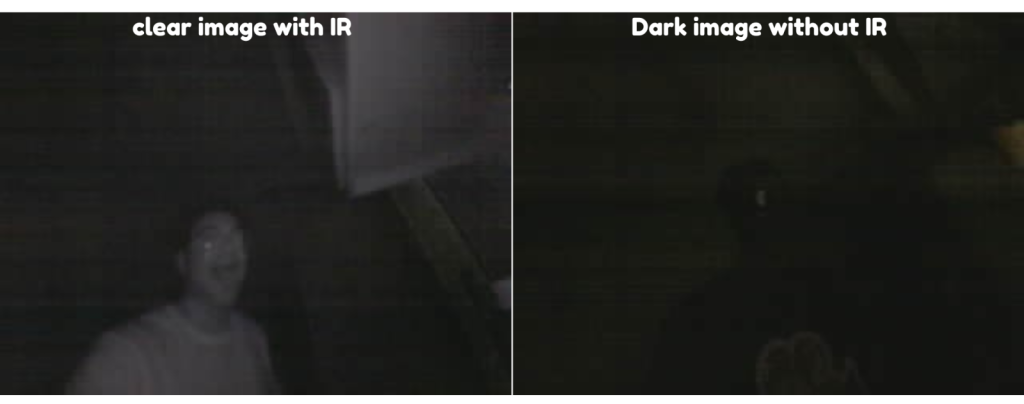
Here’s what I learned the hard way: IR LEDs must turn on BEFORE capturing the image.

When lights turn off, the camera sensor sees darkness. If you capture immediately, you get a black image – useless for AI analysis.

The correct sequence is:

text
Lights OFF detected → Turn ON IR LEDs → Wait 150ms → Capture image → Send to AI

I initially got this wrong. My first dark images were completely black. The AI reported “Unable to see anything in this image.”

Once I fixed the sequence, night vision worked perfectly. The IR LEDs emit 940nm light – invisible to human eyes but clearly visible to the camera sensor.

Your paragraph text e1779782630155

The Complete Code

Full code available on GitHub: https://github.com/shahrear-ab/ESP32-S3-Ai-Camera-Secuirty-Camera-Project

Setting Up Telegram Bot


StepAction
1Open Telegram, search for @BotFather
2Send /newbot and follow prompts
3Copy the bot token
4Search for @myidbot, send /getid
5Copy your chat ID

Important: Send /start to your bot before testing – bots can’t send unsolicited messages.

Your paragraph text 1 e1779782937815

Setting Up OpenAI API


StepAction
1Go to platform.openai.com/api-keys
2Create new API key
3Add minimum $5 billing credit
4Copy key into code

Cost per analysis: ~$0.002-0.005 (about 200-500 analyses per dollar)

What You’ll Receive on Telegram

Alert Message:

text
🚨 SECURITY ALERT! Light Change Detected

📊 Light Level: 45.2 Lux → 120.8 Lux (167% change)
📝 💡 Lights TURNED ON or bright event detected
🔦 Night Vision: OFF

Image: Captured photo attachment

AI Analysis:

text
🧠 AI Security Analysis:
1. A well-lit room with a desk, chair, and computer monitor
2. No person detected in current frame
3. No suspicious activity observed
4. Security status: Safe
Your paragraph text 2

Adjusting Sensitivity


ParameterDefaultEffect
LIGHT_CHANGE_THRESHOLD0.40 (40%)Lower = more sensitive, Higher = less sensitive
COOLDOWN_SECONDS20Time between triggers
LIGHT_CHECK_INTERVAL3000 (3 sec)How often light sensor reads
NIGHT_VISION_ON_THRESHOLD15 LuxBelow this = IR ON
NIGHT_VISION_OFF_THRESHOLD30 LuxAbove this = IR OFF

Troubleshooting


ProblemSolution
No Telegram messagesSend /start to your bot first, press RESET
Dark images at nightCheck IR LEDs with phone camera; ensure sequence order
Wrong light change directionCode triggers on BOTH increase AND decrease
Camera init failsEnsure camera initialized BEFORE light sensor (I2C conflict)

What I Learned

This project taught me:


LessonWhy It Matters
Init order mattersCamera must init before light sensor on same I2C bus
IR timing is criticalTurn on IR, wait, THEN capture
Hysteresis prevents flickerDifferent ON/OFF thresholds
AI can run locally-ishAPI calls work, but need internet
Telegram is perfect for alertsFree, reliable, real-time

🎥 Watch the Complete Video Tutorial

See the security camera in action – live testing, night vision demo, and Telegram alerts:

📺 AI Security Camera with Night Vision | ESP32-S3 Project

👉 Don’t forget to Subscribe to Roborear on YouTube for more robotics and AI projects every week!

Your Turn

This project transformed how I think about security cameras. No cloud subscriptions. No privacy concerns. Just a $35 board that sees in the dark and tells me what it sees.

Now go build yours. Set it up in a dark room. Watch the IR LEDs glow (through your phone camera). Get AI analysis sent to your phone.

And when it catches something unexpected? You’ll know exactly what happened.

FAQs

1. Why do I need to turn on IR LEDs BEFORE capturing the image? Why can't they just stay on?

This is the most critical lesson from this project. The IR LEDs take about 100-150ms to reach full brightness after being turned on. If you capture immediately when the lights turn off, the camera sensor sees darkness and you get a black image.

The correct sequence is: Detect light change → Turn ON IR LEDs → Wait 150ms → Capture image → Send to AI.

If you leave IR LEDs on continuously, they’ll drain power and overheat. The automatic ON/OFF based on ambient light gives you the best of both worlds: night vision when needed, power savings when not.

You can verify IR LEDs are working by looking at the board through your phone’s camera – you’ll see a purple/white glow that’s invisible to your naked eye.

The system uses GPT-4o-mini, which is surprisingly accurate for general scene description. In my testing, it correctly identifies:

  • Presence/absence of people (~90% accuracy in good lighting)

  • Room types (living room, bedroom, office)

  • Unusual activity (open doors, moved furniture)

  • Security status (Safe/Caution/Alert)

However, it has limitations:

  • It cannot recognize specific faces (no facial recognition built-in)

  • Very fast movement may be blurry

  • Extreme low-light reduces accuracy

For a DIY security system, it’s more than sufficient. You’re not replacing a professional $1000 system – you’re getting intelligent alerts that tell you what happened, not just that something happened.

Cost per analysis is ~$0.002-0.005, so 200-500 alerts cost about $1.

3. Can this run on battery? How long will it last?

The ESP32-S3 draws about 150-250mA when active, plus up to 300mA for IR LEDs. A typical 2000mAh LiPo battery would last 4-8 hours with continuous operation.

However, you can dramatically extend battery life with these modifications:

cpp
// Put ESP32 into deep sleep between light checks
esp_sleep_enable_timer_wakeup(3 * 1000000); // Wake every 3 seconds
esp_deep_sleep_start();

With deep sleep, the ESP32 draws only ~10µA between checks. A 2000mAh battery could last weeks or months.

The trade-off? The camera needs 2-3 seconds to wake up and capture, so you might miss very brief events. For most security applications, this is acceptable.

For permanent installation, use a USB power adapter – it’s simpler and more reliable.

Leave a Comment

Your email address will not be published. Required fields are marked *

Scroll to Top