
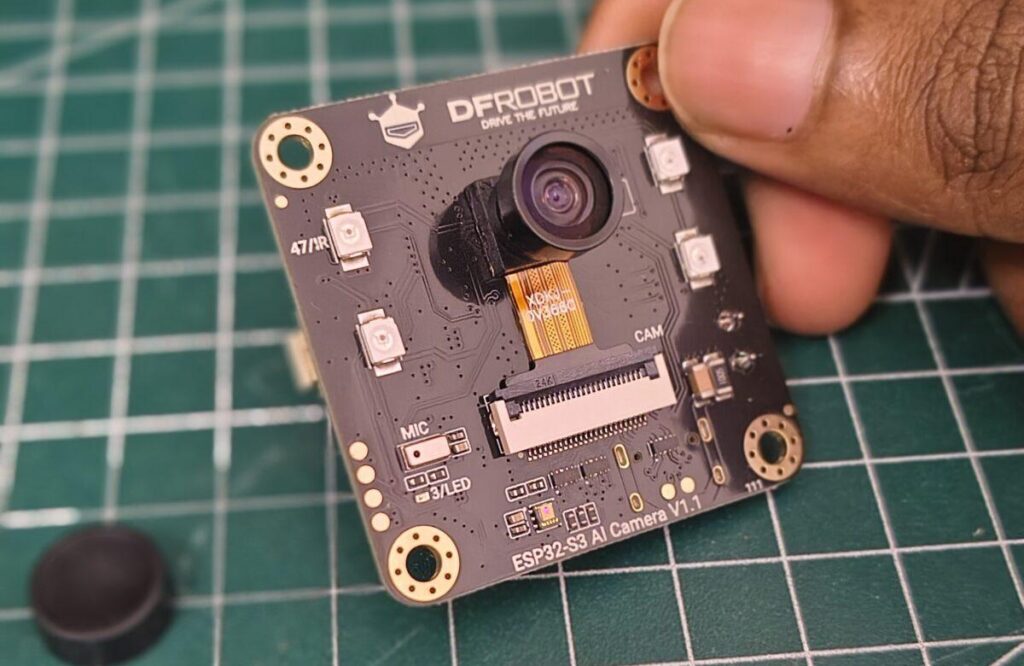
The “Wait, This Thing Has Night Vision?” Moment – ESP32 S3 AI Camera
I’ve used a lot of ESP32 cameras. The classic ESP32-CAM is great for streaming, but it’s basically just an eye. It sees, but it doesn’t listen, and it definitely doesn’t talk back.
Then I got my hands on the DFRobot DFR1154 ESP32 S3 AI Camera Module.
I unboxed it. Hooked it up. And I was genuinely surprised. This little 42mm x 42mm board doesn’t just take pictures—it has night vision, an onboard microphone, a speaker amp, and enough processing power to run AI models locally.
It’s not just a camera. It’s a complete edge AI sensor hub. After weeks of testing, here is my honest breakdown of whether you should add this to your robotics toolkit.
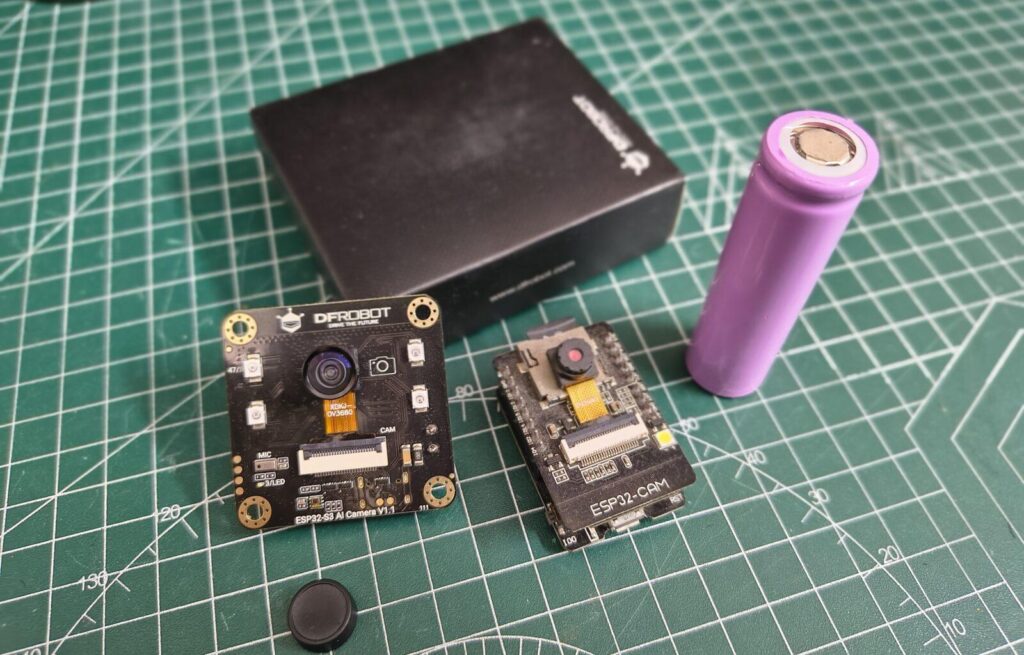
What Is the DFRobot DFR1154 – ESP32 S3 AI Camera?
The DFRobot DFR1154 is a powerful development board built around the ESP32 S3 chip. Unlike standard camera modules that only stream video, this one is designed to process everything on the device itself .
Here’s the spec sheet that matters:
| Feature | Specification |
|---|---|
| Processor | ESP32 S3 (Dual-core, 240 MHz) |
| Memory | 16MB Flash + 8MB Octal PSRAM (Crucial for AI) |
| Camera Sensor | OV3660 (2MP, 160° Wide Angle) |
| Night Vision | IR LEDs + ALS (Ambient Light Sensor) |
| Audio | PDM Microphone + MAX98357 Speaker Amp |
| Connectivity | Wi-Fi 2.4GHz & BLE 5 |
| Storage | MicroSD Card Slot |
| Dimensions | 42x42mm |
The selling point here is the 8MB PSRAM combined with the OV3660 sensor. Unlike the OV2640 found on cheaper boards, the OV3660 offers higher resolution and better performance for professional embedded devices .
First Impressions – ESP32 S3 AI Camera: The Good
1. The All-in-One Hardware (The “Brain” Factor)
This is where the DFR1154 destroys the competition. It’s a multi-sensor fusion device. You get:
160° Wide-Angle IR Camera: Sees more, and sees in the dark .
IR LEDs + Light Sensor: The board can detect low light and automatically switch to night mode.
Onboard Mic & Amp: It listens and speaks. You don’t need external shields for voice .
Hardware Ports: USB-C for power/data, a Speaker connector, and a Gravity interface for external sensors .
If you want to build a baby monitor that alerts you when the baby cries, or a doorbell that talks to visitors, this board has everything built-in. No soldering rats’ nests required.
2. True Night Vision
The OV3660 sensor is sensitive to 940nm infrared light. Combined with the onboard IR LEDs, this thing can actually see in complete darkness .
3. Edge AI Capabilities
The “AI” in the name isn’t just marketing fluff. The 8MB PSRAM allows you to run TensorFlow Lite and Edge Impulse models directly on the device .
This is huge for privacy. The camera can detect a face or an intruder and trigger an action without sending your video feed to the cloud.
The Weird & The Frustrating (The “DFRobot Way”) – ESP32 S3 AI Camera
No board is perfect. The DFR1154 has some serious quirks you need to know about before buying.
1. The Arduino IDE Setup is a Chore
This is not plug-and-play. You cannot just install the standard ESP32 board package and expect it to work.
Board Version Matters: The audio library (
ESP32-audioI2S) has major conflicts with ESP32 core 3.x.x.The Fix: If you want the audio code to compile, you must downgrade your ESP32 Board Package in Arduino IDE to version 2.0.17.
2. WiFi Connection Headaches (The “Channel 1” Fix)
This specific model (DFR1154) apparently has a known hardware/PCB flaw regarding WiFi connectivity. Users report that while it connects fine at work, it refuses to connect at home .
The Solution (If you buy this): You must manually go into your router settings and set the 2.4GHz WiFi Channel to “1” . Alternatively, if you’re a hardware wizard, you can replace a specific capacitor (R4) with a 15-22nH inductor .
3. The Serial Monitor Blackout
When you upload code, the Serial Monitor often shows nothing, even though the code is running. You might bang your head against the wall trying to see the IP address .
The Fix: Try changing the Serial Monitor baud rate to 9600 even if your code is set to 115200. Sometimes it outputs boot logs at the lower speed.
What Can You Actually Build With ESP32 S3 AI Camera?
This board is specific. It is for Edge AI and Voice Interaction.
| Project Tier | Idea | Feasibility |
|---|---|---|
| Tier 1 (Vision) | AI Smart Doorbell | High (Edge Impulse + Telegram Bot) |
| Tier 2 (Vision) | Industrial Meter Reader | High (OpenCV + YOLO) |
| Tier 3 (Audio) | Voice-Activated Smart Assistant | Medium (ChatGPT + Speaker) |
| Tier 4 (Audio) | Baby Cry Detector | Medium (Edge Impulse Audio) |
| Tier 5 (Hybrid) | “LLM-Powered” Receptionist | Advanced (See Edge Impulse Project) |
Project Spotlight with ESP32 S3 AI Camera: The AI Receptionist
I found a brilliant project where a developer used the DFR1154 to create an AI Doorbell . When someone rings the bell:
The camera takes a picture.
A local Edge Impulse model detects if a face is present.
It sends the image to ChatGPT via API.
The AI decides if the person is allowed in and speaks the decision through the speaker.
You cannot do this with a standard ESP32-CAM.
🔗 Official Resources & Further Reading – ESP32 S3 AI Camera
📚 DFRobot Official Documentation
Before you start building with the DFR1154, I highly recommend checking out the official resources. DFRobot provides detailed wiki pages, schematics, and example codes that are essential for unlocking the full potential of this board.
👉 DFRobot DFR1154 Official Wiki & Documentation
Bookmark this page. You will need the pinout diagram and the library references.
The Competition: ESP32 S3 AI Camera vs. ESP32-CAM
| Feature | DFRobot DFR1154 (This Board) | Standard ESP32-CAM |
|---|---|---|
| Price | ~$25-30 | ~$8-12 |
| Sensor | OV3660 (Better low-light) | OV2640 (Standard) |
| PSRAM | 8MB (Essential for AI) | 4MB |
| Audio | Mic + Amp (Built-in) | None (Requires external module) |
| Night Vision | Yes (IR LEDs + Sensor) | No |
| Ease of Use | Low (Requires driver hacks) | Medium |
| Best For | AI Security, Voice Assistants | Basic Streaming, RC Cars |
Verdict: The DFR1154 is objectively better hardware. However, the standard ESP32-CAM is “easier” to get running for basic tasks. You pay for the features with setup complexity.
Final Verdict – ESP32 S3 AI Camera: Should You Buy It?
Buy the DFRobot DFR1154 if:
You want to build a privacy-first security system (AI runs locally).
You need audio input/output (voice assistants) without extra wiring.
You are comfortable with Arduino IDE configuration (downgrading cores, editing router channels).
You want to experiment with TinyML and Edge Impulse.
Skip it if:
You just want a simple live video feed for an RC Car (buy an ESP32-CAM).
You are a complete beginner who gets frustrated by “Board Not Found” errors.
You cannot access your router settings (to change the WiFi channel to 1) .
This board is a powerful tool for advanced makers. It has quirks, but the fact that it gives you a microphone, speaker, night vision, and 8MB of PSRAM for $30 is incredible.
If you’re willing to fight through the initial setup (downgrading ESP32 core to 2.0.17 and changing your router’s 2.4GHz channel to 1), the DFR1154 is one of the most versatile IoT cameras on the market.
What Can You Actually Build With ESP32 S3 AI Camera?
| Project Type | Difficulty | Notes |
|---|---|---|
| Camera Web Server | ⭐⭐ | Stream video to browser |
| Face Detection | ⭐⭐⭐ | Using ESP-DL or Edge Impulse |
| Audio Recorder/Player | ⭐⭐⭐ | With I2S microphone and speaker |
| Smart Doorbell | ⭐⭐⭐⭐ | Add button, PIR sensor, cloud |
| TinyML Classifier | ⭐⭐⭐⭐ | Person, object, or gesture recognition |
| Wi-Fi Camera with Display | ⭐⭐ | View camera feed on the tiny LCD |
The 8MB PSRAM makes it possible to run ESP-DL (Espressif’s deep learning library) for face detection and recognition directly on the device – no cloud required.
Final Thoughts ESP32 S3 AI Camera
The DFRobot ESP32 S3 AI Camera is not for everyone. It’s for tinkerers, students, and hobbyists who want to push the limits of low-cost edge AI.
It’s not plug-and-play. It’s not perfect. But for $25-30, it’s a remarkable piece of engineering.
If you buy one, expect to:
Read documentation
Try multiple firmware examples
Search forums
Celebrate when the LED finally blinks
That’s the joy of this hobby.
🧠 More Roborear Tutorials for Your ESP32 Journey
Mastering the DFR1154 requires understanding the ESP32 ecosystem. Here are some of my other guides that will help you integrate this camera into your robotics projects:
How to Use a Joystick with ESP32: Complete Beginner’s Guide – Perfect for controlling your AI camera’s pan-tilt mount.
Build Your Own Otto Robot: Walking, Dancing, Obstacle Avoidance – Learn servo control and robot assembly basics before adding vision.
Should You Learn Coding for Robotics? Or Will AI Do Everything? – A must-read if you plan to run AI models on this edge device.

