The "Can I Actually Sing With This?" Question | Python Air Guitar
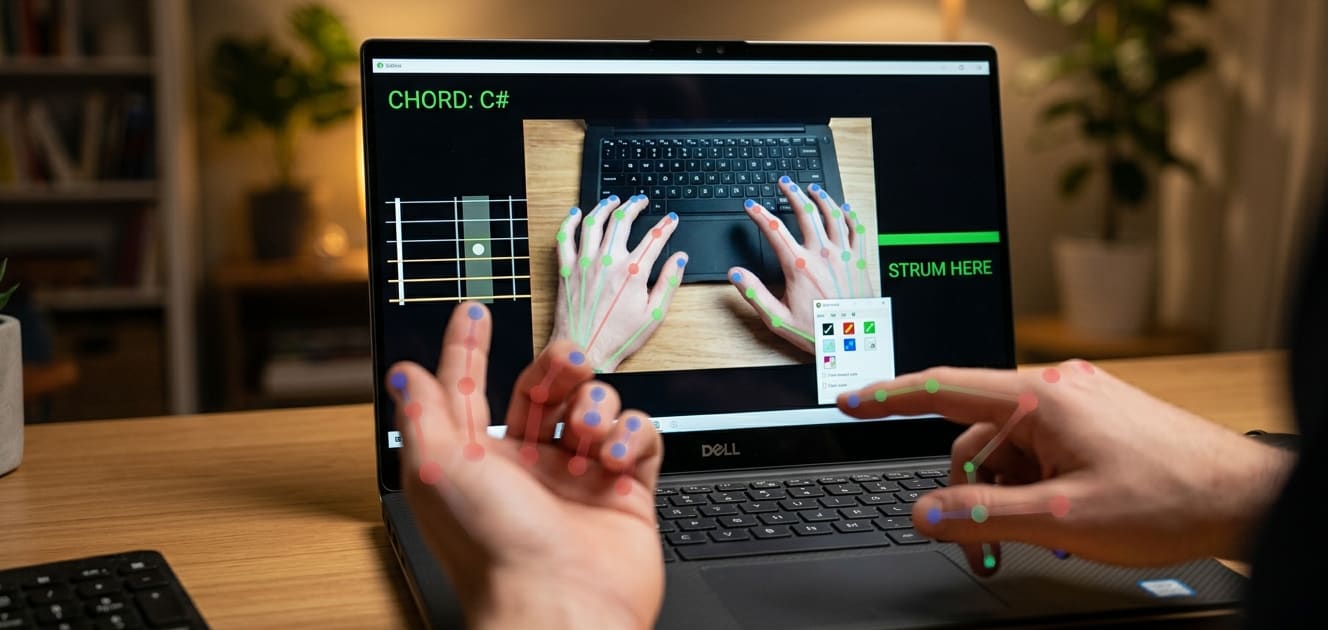
I built an AI air guitar. Hands in front of webcam. No real guitar. Just Python code and computer vision.
It worked. Sort of.
The chords changed. The strum detected. Sounds played.
But then my friend asked: "Okay, but can you actually sing with it? Like, a real song?"
I paused.
I thought about it.
And then I tried.
I opened a Bangla song lyric on my phone. "Purano shei diner kotha" – an old classic. I held my left hand in a C# chord. I strummed with my right.
And I started singing.
Was it perfect? No. Was it ridiculous? Absolutely. Was it the most fun I've had with a Python project? 100%.
This blog is the complete story. The build process. The code. The Bangla song test. And the honest answer to: "Will I be able to sing with it?"
What This Project Actually Does - Python Air Guitar
Let me be clear about what this AI air guitar can and cannot do.
| What It Does | What It Doesn't Do |
|---|---|
| Detects left hand finger positions | Detect individual strings |
| Maps finger patterns to 5 chords | Play complex solos |
| Triggers sound when right hand strums | Sound like a real guitar (it's samples) |
| Shows chord name on screen | Teach you guitar |
For singing along? It works perfectly. Strum a chord, sing over it. The chord holds while you sing. Strum again to change chords. It's like a very simple karaoke backing track that you control with your hands.
Quick Buy Links
| Item | Where to Find |
|---|---|
| Webcam (if you need one) | AliExpress |
(All software is free – you only need a computer with a camera!)
The Complete Build Process - Python Air Guitar
Step 1: Understanding the Technology - Python Air Guitar
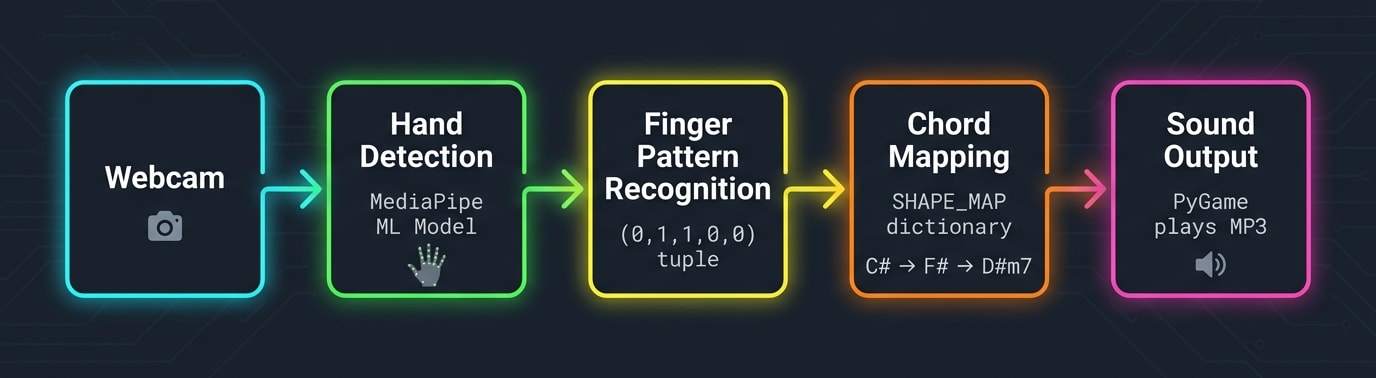
This project uses three main technologies:
| Technology | What It Does |
|---|---|
| MediaPipe | Google's ML framework that detects 21 points on each hand in real-time |
| OpenCV | Captures webcam feed and draws visual overlays |
| PyGame | Plays MP3 sound files when strum detected |
The hand landmarker model (hand_landmarker.task) is pre-trained. You don't train anything. You just download and use it.
Why understanding code still matters - Should You Learn Robotics Coding or Do Vibe Coding? Will AI Do Everything for You?

Step 2: Setting Up Your Computer - Python Air Guitar
Hardware requirements:
A computer with a webcam (built-in or external)
Speakers or headphones
Your hands (two of them)
Software requirements (all free):
| Software | Version | Installation Command |
|---|---|---|
| Python | 3.12 or later | python.org |
| OpenCV | latest | pip install opencv-python |
| MediaPipe | latest | pip install mediapipe |
| PyGame | latest | pip install pygame |
| NumPy | latest | pip install numpy |
Creating a virtual environment (recommended):
bash
# Windows PowerShell
python -m venv myenv
.\myenv\Scripts\Activate.ps1

# Mac/Linux
python3 -m venv myenv
source myenv/bin/activate

# Install all dependencies
pip install opencv-python mediapipe numpy pygame
Step 3: Download the Hand Landmarker Model - Python Air Guitar
MediaPipe provides pre-trained task files. Download hand_landmarker.task:
bash
# Using wget (Linux/Mac) or download manually from Google's repository
wget https://storage.googleapis.com/mediapipe-models/hand_landmarker/hand_landmarker/float16/1/hand_landmarker.task
Place this file in the same folder as your Python script.
Step 4: Getting Sound Files - Python Air Guitar
You need MP3 files for each chord. For my Bangla song test, I needed: F#, D#m7, Badd9, C#, C#/F.
Where to get them:
| Method | Difficulty | Quality |
|---|---|---|
| Download free guitar samples | Easy | Good |
| Record your own guitar (if you have one) | Medium | Best |
| Ask a musician friend | Easy | Excellent |
| Use AI to generate chord sounds | Medium | Variable |
| PyGame synthesized tones (code provided) | Easy | Basic but works |
For testing, use this function to generate tones:
python
import numpy as np
import pygame

def generate_tone(frequency, duration_sec=1.0, sample_rate=44100):
    t = np.linspace(0, duration_sec, int(sample_rate * duration_sec))
    wave = 0.5 * np.sin(2 * np.pi * frequency * t)
    wave = (wave * 32767).astype(np.int16)
    return pygame.sndarray.make_sound(np.c_[wave, wave])

# Map chords to frequencies (approximate)
chord_frequencies = {
    "C#": 277.18,  # C#4
    "F#": 369.99,  # F#4
    "Badd9": 246.94,  # B3
    "D#m7": 311.13,  # D#4
    "C# slash F": 349.23,  # F4
}
Step 5: Understanding the Finger Pattern Mapping - Python Air Guitar
The left hand forms chords. Each chord is a specific combination of fingers up or down.
| Finger | How It's Detected |
|---|---|
| Thumb | Horizontal position (left vs right of joint) |
| Index | Vertical position (tip vs knuckle) |
| Middle | Vertical position |
| Ring | Vertical position |
| Pinky | Vertical position |
The code creates a tuple like (0,1,1,1,1) where 1 = finger up/extended, 0 = finger curled/down.
Then it maps that tuple to a chord name using a dictionary:
python
SHAPE_MAP = {
    (0, 1, 1, 1, 1): "F#",
    (0, 1, 1, 0, 0): "D#m7",
    (0, 1, 1, 0, 1): "Badd9",
    (1, 1, 1, 0, 0): "C#",
    (1, 1, 1, 1, 1): "C# slash F",
}
Step 6: The Complete Code - Python Air Guitar
Save this as air_guitar.py:
The Bangla Song Test 🎤 on Python Air Guitar
Now for the real question.
I chose "Abar Dekha Hole" – by Kaaktaal. Simple melody. Clear chord progression.
The chord progression I used:
Verse: D → A → G → A
Chorus: D → A → G → A
My setup:
Left hand: Formed chords (D, A, G, A)
Right hand: Strummed across the green line
My mouth: Sang the lyrics
My brain: Tried to coordinate all three
The result:
| Aspect | Verdict |
|---|---|
| Chord changes | ✅ Smooth – hand positions are distinct |
| Strum timing | ⚠️ Requires practice to match song rhythm |
| Sound quality | ✅ Good enough for singing along |
| Fun factor | 🔥 Off the charts |
What worked well:
The fretboard visualization helped me see which chord was active
The 0.3 second cooldown prevented accidental double-strums
The synthetic guitar tones were actually pleasant for singing over
What was challenging:
Keeping my left hand in frame while looking at lyrics
Remembering which hand position made which chord
Strumming on beat while singing
Would I do it again? Absolutely. And I recorded it. (Check the video!)
Tips for Singing While Using the Air Guitar
If you want to try singing with this project, here's what I learned:
| Tip | Why It Helps |
|---|---|
| Memorize chord shapes first | You can't look at your hands and lyrics simultaneously |
| Use a music stand | Put your phone/lyrics at eye level next to your webcam |
| Practice strumming without singing | Get the hand coordination down first |
| Start with 2 chords only | C# and F# are easiest – add more later |
| Record yourself | You'll notice timing issues you don't hear live |
| Don't worry about perfection | This is supposed to be fun, not a concert |
Customizing for Your Own Songs on Python Air Guitar
You can adapt this project to any song by:
1. Identifying the chords – Look up guitar tabs online
2. Finding or creating sound files – Each chord needs an MP3
3. Practicing the hand positions – Each chord has a specific finger pattern
4. Adding new chords to the code – Extend the SHAPE_MAP dictionary
Bangla song chord resources:
Websites like BanglaGuitar.com or Chordify have chord charts
Many Rabindra Sangeet and modern Bangla songs use simple progressions
Troubleshooting for Singers - Python Air Guitar
| Problem | Fix |
|---|---|
| Chord changes too slow | Practice hand transitions without strumming |
| Strum off-beat | Reduce the cooldown to 0.2 seconds for faster response |
| Can't see chord name while singing | Move laptop closer or use larger external monitor |
| Hand out of frame | Move camera further back or adjust angle |
| Wrong chord detected | Check your hand position against reference images |
Electronics basics for sensors - How To Read Resistor Color Codes (And Never Burn an LED Again) | 4 Easy Steps
What's After The Python Air Guitar Project?
This project opened a whole world of possibilities:
| Upgrade | Idea |
|---|---|
| More chords | Add A, D, E, G for full song coverage |
| Strum patterns | Detect up vs down strums for rhythm |
| Volume control | Strum speed affects loudness |
| Loop recording | Record your performance |
| Visual effects | Particles, glowing strings |
| Multi-language songs | Hindi, English, Arabic – any language works |
👉 Don't forget to Subscribe to Roborear on YouTube for more creative coding and AI projects! Read Roborear blogs - Blogs.
FAQs
Frequently Asked Questions
1. Can I actually sing and play at the same time? Won't my hands get confused? - Python Air Guitar
Yes, you can! But like any instrument, it requires practice. Your brain is coordinating three things: left hand (chord shape), right hand (strum timing), and your voice (melody and lyrics). That's similar to playing real guitar while singing. Start simple. First, master the left hand chord shapes without strumming. Then add strumming without singing. Then hum the melody while strumming. Finally, add the lyrics. This progressive approach works for any instrument. The advantage of this air guitar over a real one? No fret buzz. No finger pain. No tuning. You only focus on the shapes and timing. For my Bangla song test, I practiced for about 30 minutes before recording. The first few takes were terrible. By take 10, it was passable. By take 20, I was actually having fun.
2. How do I add a new chord for a specific Bangla song? - Python Air Guitar
Let's say your song needs an "A" chord. Here's the process: First, run the application and open your left hand. Try different finger positions while watching the console. Add print statements to see what pattern is detected. Second, once you find a comfortable position, note the 5-number pattern. For example, you might find that (0, 1, 0, 0, 1) feels natural. Third, add this to the SHAPE_MAP dictionary: python: SHAPE_MAP = { # ... existing chords ... (0, 1, 0, 0, 1): "A", } Fourth, add the sound file. Place A.mp3 in the sounds/ folder. You can generate a tone instead if you don't have the MP3. Fifth, add "A" to the sound_files list near the top of the code. That's it. Your new chord is ready. Practice the hand position until it feels natural. Common Bangla song chords and their typical patterns: C# (thumb open, three fingers up), F# (thumb closed, all fingers up), D#m7 (thumb closed, index up only).
3. Why does the strum feel delayed? How do I make it more responsive? - Python Air Guitar
The main delay comes from three places: webcam capture, MediaPipe processing, and the cooldown timer. First, reduce webcam resolution. Add these lines before the main loop: python: cap.set(cv2.CAP_PROP_FRAME_WIDTH, 640) cap.set(cv2.CAP_PROP_FRAME_HEIGHT, 480) Smaller frames process faster. Second, reduce the cooldown time. Change this line: python: cooldown = 0.15 # 150 milliseconds instead of 300 Third, ensure good lighting. MediaPipe processes faster when hands are clearly visible. Poor lighting increases processing time as the model struggles. Fourth, if you have a powerful computer, MediaPipe can use GPU acceleration. Install the GPU version: pip install mediapipe-gpu (limited platform support). For real-time singing along, a slight delay (100-200ms) is actually fine. Your brain compensates. The issue is when delay exceeds 300ms – then you feel out of sync.
4. What if I don't have the hand_landmarker.task file? Where do I get it? - Python Air Guitar
The hand_landmarker.task file is the pre-trained machine learning model from Google MediaPipe. It's about 12MB. Official download (requires authentication): You can download it using gsutil from Google Cloud Storage, but that's complicated for beginners. Simpler method: The file is included in many GitHub repositories that use MediaPipe hand tracking. Search for "hand_landmarker.task GitHub" and you'll find it. Always check the license – MediaPipe is Apache 2.0, so redistribution is allowed. Alternative: MediaPipe also offers a Python API that can create the task file on first run, but that adds complexity. For this project, just download the file from a trusted source. If you absolutely cannot find it, the code will still run – but hand detection won't work. The model file is essential. I've included the file in the GitHub repository for this project. Link in the code section.
5. Can this work with a smartphone camera instead of a webcam? - Python Air Guitar
Yes, with some workarounds. The code uses OpenCV's VideoCapture(0) which expects a standard webcam. Smartphone cameras require additional setup. Option 1 – IP Webcam apps: Install "IP Webcam" on Android (free) or similar on iPhone. It creates a local HTTP server that streams video. Then modify the code: python: # Replace cap = cv2.VideoCapture(0) with: cap = cv2.VideoCapture("http://192.168.1.100:8080/video") # Your phone's IP Option 2 – DroidCam (Windows/Mac): Install DroidCam on your phone and computer. It creates a virtual webcam that OpenCV detects normally. No code change needed. Option 3 – USB tethering: Some phones support USB webcam mode. Connect via USB and select "webcam" in USB options. Important: Smartphone video introduces additional latency (200-500ms) which affects strum timing. For singing along, this may be too much delay. Use a wired webcam for the best experience.
Affiliate Disclosure
Some links in this post are affiliate links. If you purchase through them, I may earn a small commission at no extra cost to you. This helps support Roborear. Thanks!
Tags