
How To Read Resistor Color Codes (And Never Burn an LED Again) | 4 Easy Steps
The “Poof” Moment | Resistor Color Code
Every electronics beginner has this moment.
You’re building a circuit. You connect an LED. You power it on.
Poof.
A tiny puff of smoke. The LED glows bright for a split second, then goes dark forever.
Congratulations. You just killed your first component.
I’ve done it. Everyone has done it.
The cause? You forgot the resistor. Or you used the wrong one.
Resistors are the unsung heroes of electronics. They’re cheap, simple, and absolutely critical. They protect your LEDs. They keep your sensors stable. They save your ESP32 from burning out.
But they have this weird resistor color code system that looks like a secret language.
Today, I’m going to teach you the language – Resistor Color Code.
What’s a Resistor and Why Should You Care?
A resistor does exactly what its name says: it resists the flow of electricity.
Think of it like a narrow pipe in a water system. The narrower the pipe, the less water flows through.
| Feature | What It Means |
|---|---|
| Resistance (Ohms – Ω) | How much it resists. Higher = less current flow. |
| Power rating (Watts) | How much heat it can handle before burning up. |
| Tolerance (%) | How accurate the resistance is (gold = ±5%, silver = ±10%). |
Why do you need them?
| Component | Without Resistor | With Correct Resistor |
|---|---|---|
| LED | 💀 Dies instantly | 💡 Glows happily |
| ESP32 input pin | 🔥 Internal damage possible | ✅ Safe |
| Transistor base | ⚠️ Unpredictable behavior | ✅ Controlled switching |
That “poof” moment I mentioned? That’s an LED drawing too much current because there was no resistor to limit it.
A $0.01 resistor would have saved it.
Turn on the LED with Google Assistant? – Smart Home Automation Project: Control Your Lights with ESP32 and Google Assistant
The Resistor Color Code: A Quick History
Why shoud you learn resistor color codes? In the old days, resistors had their values printed on them in tiny numbers. But numbers are hard to read when the component is small.
So someone invented the resistor color code.
Four or five colored bands: each color represents a number.
| Color | Digit | Meaning for Multiplier |
|---|---|---|
| Black | 0 | × 1 |
| Brown | 1 | × 10 |
| Red | 2 | × 100 |
| Orange | 3 | × 1,000 (1k) |
| Yellow | 4 | × 10,000 (10k) |
| Green | 5 | × 100,000 (100k) |
| Blue | 6 | × 1,000,000 (1M) |
| Violet | 7 | × 10,000,000 |
| Gray | 8 | × 100,000,000 |
| White | 9 | × 1,000,000,000 |
| Gold | – | × 0.1 (±5% tolerance) |
| Silver | – | × 0.01 (±10% tolerance) |
The mnemonic trick (Warning: slightly offensive but highly memorable):
“Bad Boys Rape Our Young Girls But Violet Gives Willingly”
Or the cleaner version:
“Big Boys Race On Yellow Goats But Violet Goes Wild”
I’ll stick with the first one. It’s not PC, but it works. Mnemonics are fun for memorizing resistor color codes.
How to Read a 4-Band Resistor (Most Common)
Most resistors you’ll use have 4 color bands.
Here’s what each band means:
| Band Position | What It Represents | Example (Red, Violet, Orange, Gold) |
|---|---|---|
| 1st band | First digit | Red = 2 |
| 2nd band | Second digit | Violet = 7 |
| 3rd band | Multiplier | Orange = × 1,000 |
| 4th band | Tolerance | Gold = ±5% |
Calculation: 27 × 1,000 = 27,000 Ω (or 27 kΩ) with ±5% tolerance.

Practice Examples of Resistor Color Code
| Resistor | Bands | Calculation | Value |
|---|---|---|---|
| Brown, Black, Brown, Gold | 1,0,×10 | 10 × 10 | 100Ω (±5%) |
| Yellow, Violet, Brown, Gold | 4,7,×10 | 47 × 10 | 470Ω (±5%) |
| Brown, Black, Yellow, Gold | 1,0,×10,000 | 10 × 10,000 | 100kΩ (±5%) |
| Red, Red, Orange, Gold | 2,2,×1,000 | 22 × 1,000 | 22kΩ (±5%) |
The Quick Check
After you calculate, ask yourself: “Does this value make sense?”
For an LED with a 3.3V supply, you typically need 220Ω to 1kΩ.
For a pull-up resistor, 10kΩ is common.
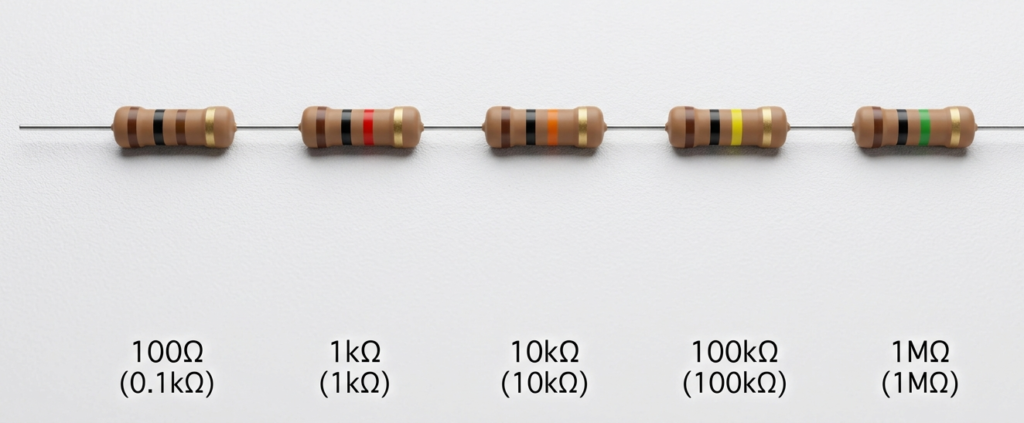
For a current-sensing circuit, very low values (like 0.1Ω) are possible.
Quick Buy Links (Affiliate)
| Component | Where to Find |
|---|---|
| 500-piece Resistor Kit | AliExpress |
| Digital Multimeter | AliExpress |
| Breadboard + Jumper Kit | AliExpress |
| LED Assorted Kit | AliExpress |
Buy these items before learning resistor color codes.
5-Band Resistors (Higher Precision)
Some resistors have 5 bands. These are more precise (usually 1% tolerance).
| Band Position | What It Represents | Example (Brown, Black, Black, Brown, Brown) |
|---|---|---|
| 1st band | First digit | Brown = 1 |
| 2nd band | Second digit | Black = 0 |
| 3rd band | Third digit | Black = 0 |
| 4th band | Multiplier | Brown = × 10 |
| 5th band | Tolerance | Brown = ±1% |
Calculation: 100 × 10 = 1,000 Ω (1 kΩ) with ±1% tolerance.
Most of your hobby projects won’t need 5-band resistors. 4-band with ±5% is fine.
How to Test Resistors with a Multimeter | Resistor Color Code
The resistor color code is great. But colors fade. Eyes get tired. Mistakes happen.
The multimeter never lies.

Step 1: Set your multimeter to the resistance (Ω) mode.
Step 2: If you have a manual-ranging meter, guess the range. For 100Ω, use the 200Ω setting. For 10kΩ, use the 20kΩ setting.
Step 3: Touch the probes to the resistor’s leads (polarity doesn’t matter).
Step 4: Read the display.
Pro tip: If you’re measuring resistor in a circuit, remove it first. Other components can affect the reading.
What Your Multimeter Might Show – Digital Demo of Resistor Color Code
| Multimeter Reading | What It Means |
|---|---|
| “OL” (Over Limit) | Resistor is open (broken) or value is higher than the range selected. |
| 0.00 | Resistor is shorted (zero resistance) or you’re touching probes together. |
| Number close to expected | Good resistor. |
| Very high or low | Resistor may be damaged or misread the color code. |
The Most Common Resistor Values You’ll Actually Use
Let me save you some time and confusion. After building dozens of projects—from blinking LEDs to walking robots—I’ve noticed that 90% of circuits use the same small set of resistor values.
Instead of memorizing every color combination, focus on these:
| Resistor Value | Resistor Color Code | Where You’ll Use It |
|---|---|---|
| 220Ω | Red-Red-Brown-Gold | Standard LED current limiting (3.3V) |
| 330Ω | Orange-Orange-Brown-Gold | LED with 5V supply |
| 470Ω | Yellow-Violet-Brown-Gold | Slightly dimmer LED |
| 1kΩ | Brown-Black-Red-Gold | Pull-up resistors, sensor lines |
| 4.7kΩ | Yellow-Violet-Red-Gold | I2C pull-ups (common with OLED displays) |
| 10kΩ | Brown-Black-Orange-Gold | Pull-down resistors, voltage dividers |
| 100kΩ | Brown-Black-Yellow-Gold | RC timing circuits, high-impedance inputs |
Pro tip: Buy resistor kits in bulk. A 500-piece assortment with these common values will cost you under $10 on AliExpress. Organize them by value in a small parts organizer. Future you will be grateful when you don’t have to decode a resistor every single time.
What about 5-band resistors? They work the same way, just with an extra digit. For example, a 1kΩ 5-band resistor is Brown-Black-Black-Brown-Brown (100 × 10 = 1kΩ, 1% tolerance). Most hobby projects don’t need this precision, but if you’re building something like a voltage reference or audio filter, the extra accuracy matters.
The one resistor you should never use: Avoid using 0Ω resistors (single black band) as jumpers unless you know exactly what you’re doing. They’re technically resistors with zero resistance, but beginners often mistake them for something else. Just use a jumper wire.
Why Resistors Burn (And How to Prevent It)
Resistors can burn. Too much current = too much heat = magic smoke.
| Cause | Prevention |
|---|---|
| Value too low for the circuit | Calculate required resistance using Ohm’s Law |
| Power rating too low | Use 1/4 watt (0.25W) or 1/2 watt (0.5W) resistors for most hobby projects |
| Short circuit downstream | Check your wiring before powering on |
| Wrong resistor in the wrong place | Double-check resistor color codes before soldering |
Ohm’s Law (The only formula you really need):
Voltage (V) = Current (I) × Resistance (R)
For an LED: R = (Supply Voltage – LED Forward Voltage) / Desired Current
Example with 3.3V supply, 2.0V LED, 20mA desired current:
R = (3.3 – 2.0) / 0.02 = 65Ω
Closest standard value: 68Ω or 100Ω (safer).

Common Beginner Mistakes – Resistor Color Code
| Mistake | Why It’s Wrong | Fix |
|---|---|---|
| Reading the bands from the wrong end – Resistor Color code | You get a completely different value (e.g., reading 100Ω as 10Ω) | The tolerance band (gold or silver) is always last. Start from the opposite side. |
| Using a 1/8 watt resistor in a 1/2 watt circuit | Resistor will overheat and fail | Check power rating. 1/4 watt (0.25W) is safe for most LED projects. |
| Ignoring tolerance | Your “10kΩ” resistor could be 9.5kΩ or 10.5kΩ | For precision circuits (like voltage references), use 1% tolerance (5-band) resistors. |
| Measuring resistance in-circuit | Other components parallel to the resistor affect readings | Remove the resistor or at least disconnect one leg. |
Practice Quiz (Test Yourself) – Resistor Color Code Quiz
What are the values of these resistors?
Red, Red, Brown, Gold
Brown, Green, Red, Gold
Yellow, Violet, Black, Gold
Brown, Black, Gold, Gold
(Answers at the end of the blog)
When You Don’t Need a Resistor
Not every circuit needs a resistor.
Powering a motor directly from a battery: The motor’s internal resistance limits current.
Powering an ESP32 from a 3.3V regulator: The regulator handles regulation.
Connecting a switch to an input pin with internal pull-up: The internal pull-up is already there (enable it in code).
But when in doubt, add a resistor. They’re cheap. Components aren’t.
Storing and Organizing Resistors | Resistor Color Code – Tips
A resistor drawer that’s all mixed up is a time-waster.
Labeled bags or compartments: Write the value on the bag or compartment.
Tape method: Tape a resistor to a piece of paper with its value written next to it.
Multimeter first: If you’re unsure of a resistor’s value, test it with a multimeter. Then you will know the values of the resistor color codes.
🎥 Watch the Step-by-Step Video Tutorial
Prefer watching over reading? See the complete resistor color code tutorial with real-time demonstrations and a multimeter in action:
📺 How to Read Resistor Color Codes Step-by-Step
👉 Don’t forget to Subscribe to Roborear on YouTube for more beginner-friendly electronics tutorials every week!
Your Turn
Resistors are the most common component in electronics. They’re also the most misunderstood. The resistor color code can be fun to learn.
Learn to read them. Learn to test them. Buy a good multimeter.
And next time you build a circuit, double-check your resistor before powering on.
No more poof. No more magic smoke.
Just working circuits.
Setting up your ESP32 programming environment – Robotics for Beginners: Learn ESP32 PlatformIO with VS Code | Blink LED Tutorial
Practice Quiz – Resistor Color Codes Answer
Red (2), Red (2), Brown (×10), Gold (±5%) = 22 × 10 = 220Ω
Brown (1), Green (5), Red (×100), Gold (±5%) = 15 × 100 = 1.5kΩ
Yellow (4), Violet (7), Black (×1), Gold (±5%) = 47 × 1 = 47Ω
Brown (1), Black (0), Gold (×0.1), Gold (±5%) = 10 × 0.1 = 1Ω
Watch all Roborear tutorials – Blogs