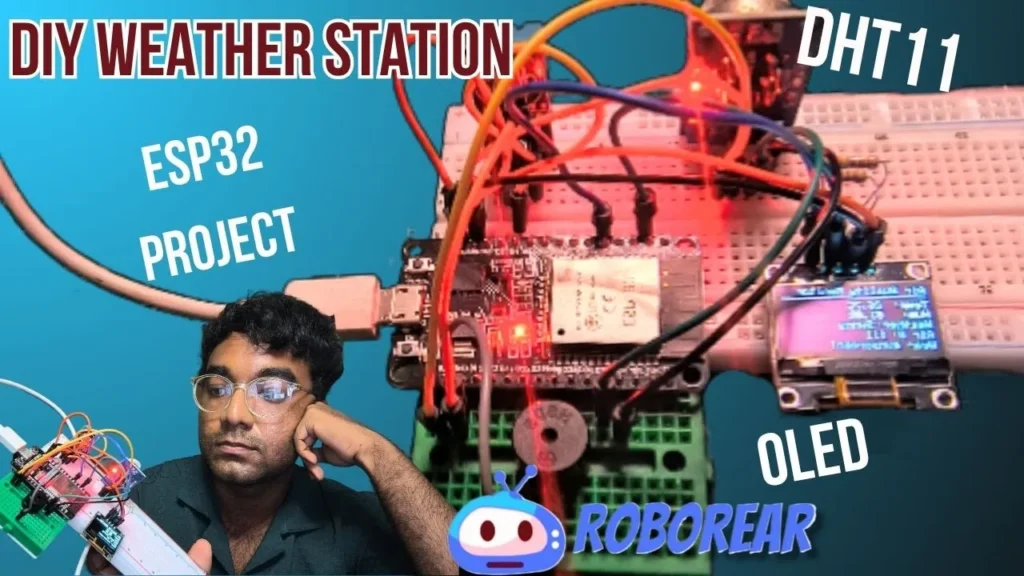
The “What’s in My Air?” Moment | DIY Weather Station
I used to wonder about the air in my room.
Is it too humid? Too dry? Is the air quality actually good?
I bought an air purifier. It had a little light. Green meant good. Red meant bad.
But that’s all it told me. No numbers. No trends. No idea what was actually happening.
So I built my own.
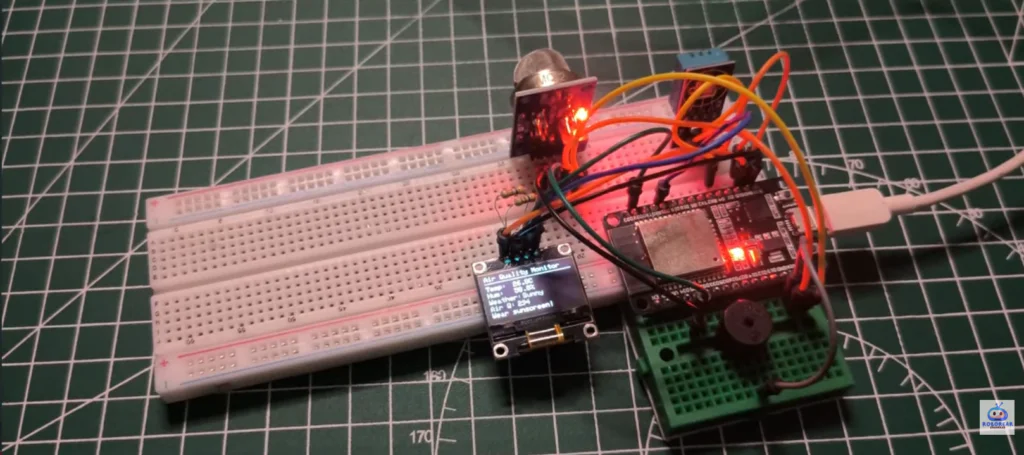
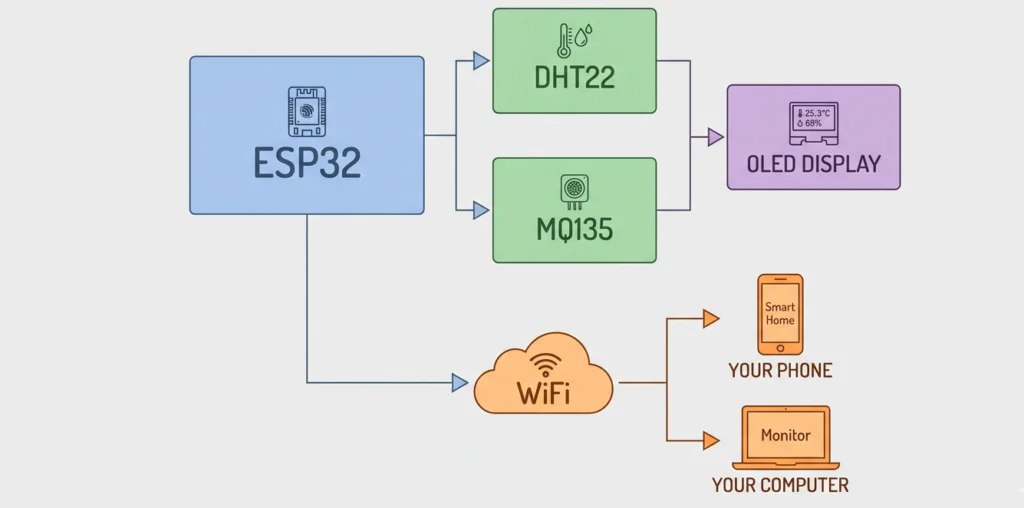
An ESP32. A few sensors. An OLED display.
Now I know exactly what’s in my air. Temperature in degrees. Humidity as a percentage. Air quality from “Good” to “Hazardous.”
And the best part? I can check it from my phone. Anywhere. Anytime.
This is the perfect intermediate project. More complex than a simple LED blinker. But not so hard that you’ll give up.
Let’s build it.
What You’ll Build
A complete diy weather station that measures:
| Measurement | Sensor | Range |
|---|---|---|
| 🌡️ Temperature | DHT22 | -40°C to 80°C (±0.5°C accuracy) |
| 💧 Humidity | DHT22 | 0% to 100% (±2-5% accuracy) |
| 🌫️ Air Quality (CO2, smoke, NH3) | MQ2 | Relative measurement (Good → Hazardous) |
Display options:
Local OLED screen shows readings instantly
Web server lets you check from any device on your WiFi
Data updates every 2 seconds
What You’ll Need
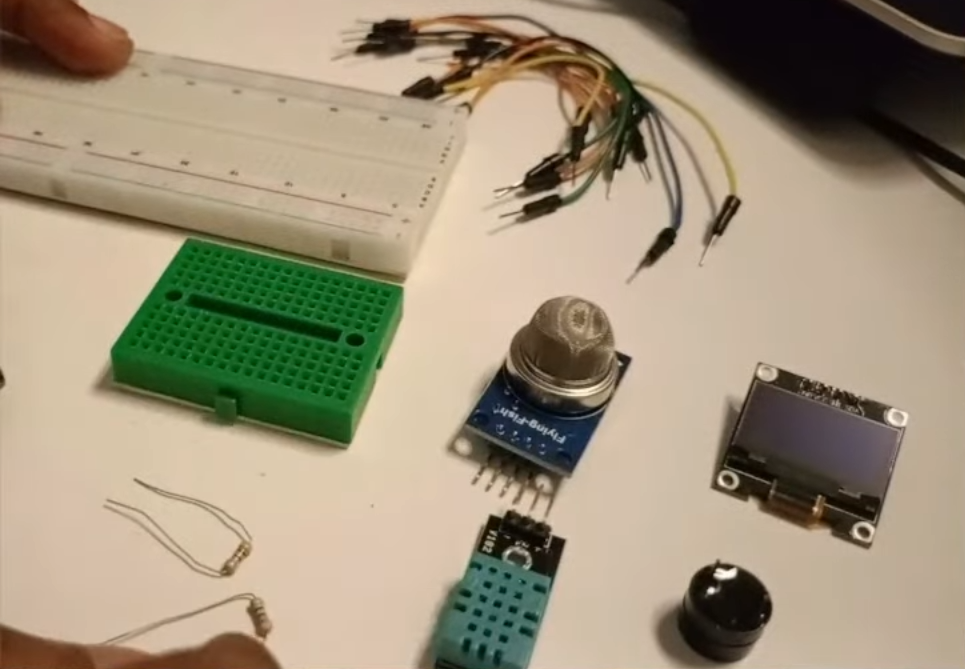
Hardware Components
| Component | Specs / Notes | Price (USD) |
|---|---|---|
| ESP32 Development Board | Any 30-pin version | $5.00 – $7.00 |
| DHT22 Temperature/Humidity Sensor | More accurate than DHT11 (±0.5°C) | $3.00 – $5.00 |
| MQ135 Air Quality Sensor | Detects CO2, smoke, NH3, benzene | $5.00 – $8.00 |
| 0.96″ OLED Display | I2C, 128×64 pixels | $2.00 – $4.00 |
| 10kΩ Resistor | For DHT22 data line (pull-up) | $0.05 – $0.10 |
| Breadboard | 400 points | $1.00 – $2.00 |
| Jumper Wires | Male-to-female & male-to-male | $1.00 – $2.00 |
| USB Cable | For power and programming | $2.00 – $4.00 |
Total: ~$19.00 – $32.00 USD
Quick Buy Links
| Component | Where to Find |
|---|---|
| ESP32 Development Board | AliExpress |
| DHT11 Sensor | AliExpress |
| MQ2 Air Quality Sensor | AliExpress |
| 0.96″ OLED Display | AliExpress |
| Breadboard + Jumper Kit | AliExpress |
Sensor Comparison: DHT11 vs DHT22
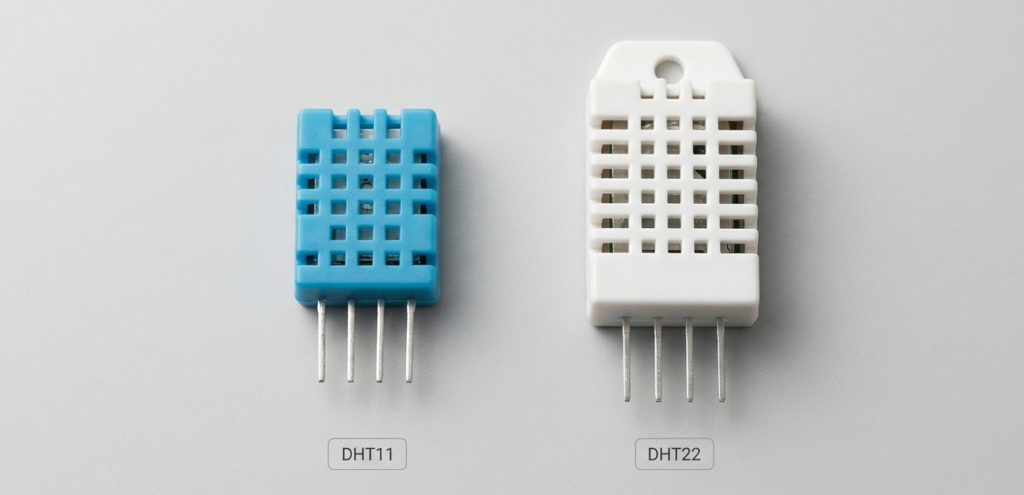
If you’ve seen the DHT11, you might wonder why I chose the DHT22.
| Feature | DHT11 | DHT22 (AM2302) |
|---|---|---|
| Temperature range | 0-50°C | -40 to 80°C |
| Temperature accuracy | ±2°C | ±0.5°C |
| Humidity range | 20-80% | 0-100% |
| Humidity accuracy | ±5% | ±2-5% |
| Sampling rate | 1 Hz (1 read/sec) | 0.5 Hz (1 read/2 sec) |
| Price | ~$2-3 | ~$3-5 |
| Best for | Basic projects | DIY Weather stations, accurate monitoring |
For a DIY weather station that actually tells you useful information, spend the extra dollar on the DHT22.
How the Sensors Work
DHT11 (Temperature + Humidity)
The DHT11 uses a capacitive humidity sensor and a thermistor to measure temperature. It sends digital data over a single wire.
Important: The DHT11 needs a 10kΩ pull-up resistor on the data line. Without it, readings will fail or be erratic.
MQ135 (Air Quality)
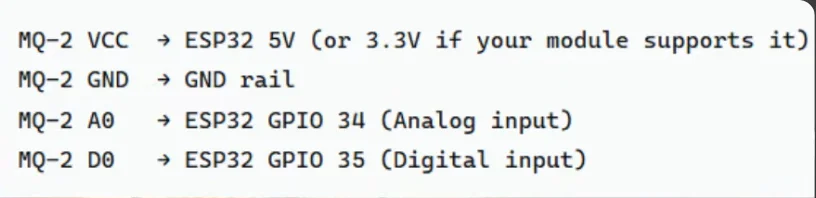
The MQ135 is a chemical sensor. It has a heating element inside that makes it sensitive to various gases:
| Gas | Detected |
|---|---|
| Carbon dioxide (CO2) | ✅ Yes |
| Smoke | ✅ Yes |
| Ammonia (NH3) | ✅ Yes |
| Benzene | ✅ Yes |
| Formaldehyde | ✅ Yes |
The sensor outputs a higher voltage when it detects more pollutants. We read this analog value and convert it to a simple quality rating.
Important: The MQ135 needs to “warm up” for 5-10 minutes before giving stable readings. This is normal.
Wiring It Up
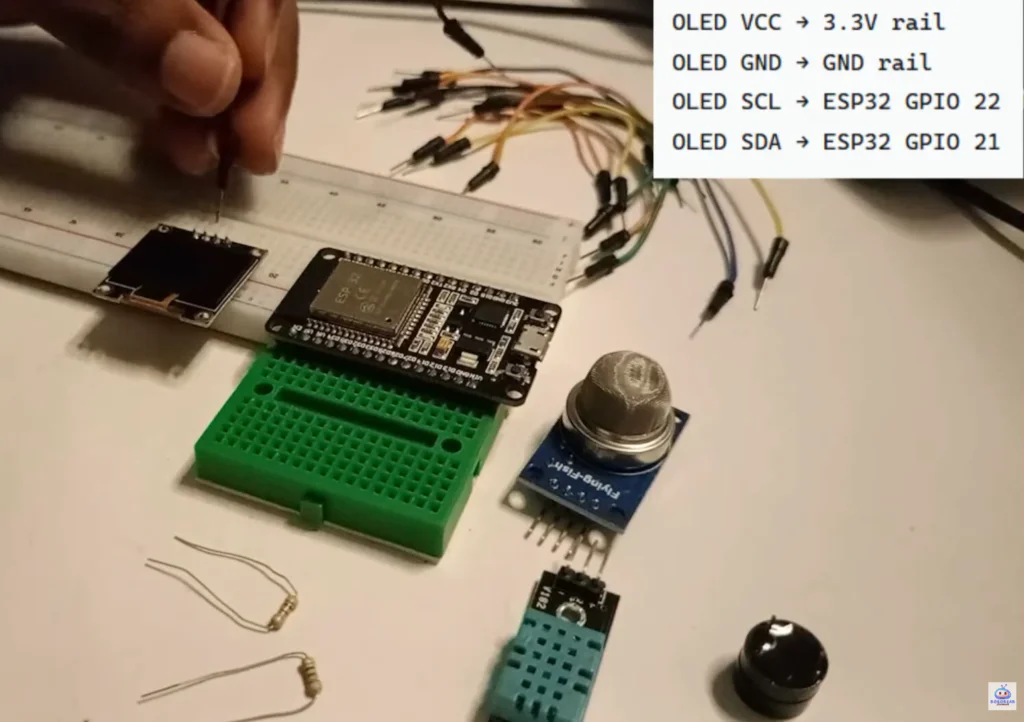
I2C OLED Display – DIY Weather Station
| OLED Pin | ESP32 Pin |
|---|---|
| VCC | 3.3V |
| GND | GND |
| SCL | GPIO 22 |
| SDA | GPIO 21 |
DHT11 Sensor – DIY Weather Station
| DHT11 Pin | ESP32 Pin | Notes |
|---|---|---|
| VCC | 3.3V | Use 3.3V, not 5V |
| GND | GND | |
| DATA | GPIO 4 | Add 10kΩ resistor from DATA to VCC |
MQ2 Air Quality Sensor – DIY Weather Station
| MQ2 Pin | ESP32 Pin | |
|---|---|---|
| VCC | 5V | MQ135 needs 5V power |
| GND | GND | |
| AO (Analog Out) | GPIO 34 | ADC input |
The Code – DIY Weather Station
Full code available on GitHub: https://github.com/shahrear-ab/roborear/blob/main/weather_station/weather_station.ino
Setting up VS Code and PlatformIO to Control Servo Motors – Robotics for Beginners: Learn ESP32 PlatformIO with VS Code | Blink LED Tutorial
Required Libraries – DIY Weather Station
Install these in Arduino IDE (Sketch → Include Library → Manage Libraries):
| Library | Author | Purpose |
|---|---|---|
| DHT sensor library | Adafruit | Reads DHT22 |
| Adafruit Unified Sensor | Adafruit | Required for DHT |
| Adafruit SSD1306 | Adafruit | Controls OLED display |
| Adafruit GFX | Adafruit | Graphics for OLED |
How to Read Air Quality Values – DIY Weather Station
The MQ135 outputs an analog value from 0 to 4095. Here’s what the numbers mean:
| Raw Value | Air Quality Status | What It Means |
|---|---|---|
| < 300 | 🟢 Good | Clean air, normal conditions |
| 300 – 600 | 🟡 Moderate | Acceptable, some pollutants present |
| 600 – 900 | 🟠 Unhealthy for Sensitive | Children, elderly, respiratory issues may be affected |
| 900 – 1200 | 🔴 Unhealthy | Everyone may experience effects |
| > 1200 | ⚫ Hazardous | Emergency conditions |
Important: These thresholds are approximate. Your sensor may read higher or lower depending on your environment and calibration.
Identifying resistor values – How To Read Resistor Color Codes (And Never Burn an LED Again) | 4 Easy Steps
Testing Your DIY Weather Station
After Uploading
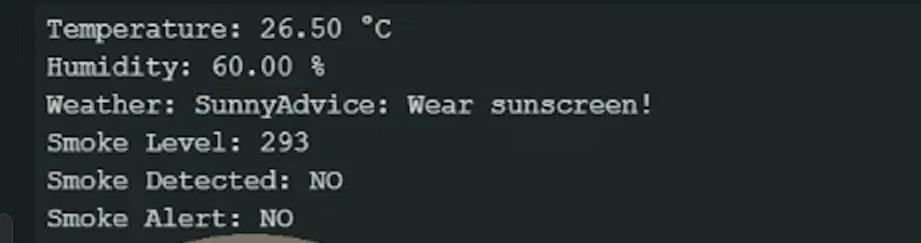
Open Serial Monitor (115200 baud)
Should show temperature, humidity, and air quality every 2 seconds
Check the OLED display
Should show all three readings clearly
Test the web server (if WiFi configured)
Open browser on phone or computer
Enter the ESP32’s IP address (shown in Serial Monitor)
See readings in a clean web page
Testing Air Quality Response – DIY Weather Station
Normal room air: Baseline reading (usually 100-400)
Near a candle or incense: Reading should increase
Near cooking: Reading may spike
Exhaling directly on sensor: CO2 from breath increases reading
To get familiar with your MQ135 sensor, try these simple experiments. Light a match or incense stick about 30cm away from the sensor. Watch the Serial Monitor – you should see the air quality value rise within 10-15 seconds. The smoke particles are detected by the sensor, causing the voltage on the AO pin to increase. Once you move the smoke source away, the value should slowly return to baseline after 20-30 seconds.
You can also test with common household items. A spray of deodorant or perfume will cause a sharp spike. Cooking oil fumes from the kitchen will show a gradual increase. Even opening a bottle of vinegar nearby will register because the MQ135 is sensitive to acidic gases.
For a fun demonstration, have someone exhale directly onto the sensor from a few inches away. The carbon dioxide in their breath will cause a noticeable jump in readings. This shows how quickly air quality changes with human presence – useful for classroom demonstrations or understanding ventilation needs in a room.
Remember that extreme values (over 1000) may take several minutes to drop back to normal because the sensor absorbs gases and needs time to “clear” itself. This is normal behavior.
Make It Your Own (Upgrades) – DIY Weather Station
| Upgrade | Difficulty | What You’ll Need |
|---|---|---|
| Add more sensors | ⭐ Easy | BMP280 (pressure), MQ7 (CO), MQ2 (combustible gas) |
| Data logging to SD card | ⭐⭐ Medium | MicroSD card module |
| Send data to cloud | ⭐⭐ Medium | Thingspeak, Blynk, or Firebase |
| Battery powered | ⭐⭐ Medium | 18650 battery + TP4056 |
| 3D printed case | ⭐⭐ Medium | 3D printer or laser cutter |
| Telegram alerts | ⭐⭐⭐ Hard | Telegram bot API |
| Historical graphs | ⭐⭐⭐ Hard | InfluxDB + Grafana |
Troubleshooting
| Problem | Likely Cause | Fix |
|---|---|---|
| DHT22 reads “nan” | Missing pull-up resistor | Add 10kΩ resistor between DATA and VCC |
| MQ135 readings unstable | Sensor not warmed up | Wait 5-10 minutes for stabilization |
| OLED shows nothing | Wrong I2C address | Try address 0x3C or 0x3D |
| Air quality always 4095 | AO pin not connected | Check jumper from MQ135 AO to ESP32 GPIO 34 |
| Air quality always 0 | MQ135 not powered | Check VCC to 5V, GND to GND |
| WiFi not connecting | Wrong credentials or 5GHz network | Use 2.4GHz network, check SSID/password |
Why DHT22 Over DHT11? – DIY Weather Station
| Reason | Explanation |
|---|---|
| Accuracy matters | ±0.5°C vs ±2°C makes a real difference |
| Better range | Sub-zero temperatures and 0-100% humidity |
| Reliability | Fewer failed readings |
| Cost difference | Only ~$2 more |
The DHT11 is fine for learning. But for a real weather station, the DHT22 is worth the extra dollar.
If your DHT22 still shows “nan” after adding the pull-up resistor, try a different GPIO pin. Some ESP32 pins have better performance for one-wire sensors. GPIO 4, 13, and 14 are good alternatives. Also, the DHT22 requires precise timing. If your code has long delays or heavy WiFi operations, the sensor reading may timeout. Move sensor readings to the beginning of your loop and add a 2-second delay between reads – the DHT22 needs at least 1.8 seconds between measurements anyway.
If your MQ135 readings fluctuate wildly even after warm-up, check for airflow. The sensor is sensitive to drafts from fans, air conditioners, or open windows. Place it in a stable environment for consistent readings. You can also add software smoothing by averaging 10 readings and dividing by 10. This reduces noise without losing responsiveness.
If your OLED display works but shows garbage or random pixels, check your I2C connections. Loose wires can cause data corruption. Also verify that you have the correct display driver in your code. Some 0.96″ OLEDs use the SH1106 driver instead of SSD1306. The symptoms look similar but the fix is simply changing the library.
For WiFi issues, try powering your ESP32 from a phone charger instead of your computer’s USB port. Computer ports sometimes provide unstable power that affects the WiFi radio.
Real-World Applications – DIY Weather Station
| Use Case | How It Helps |
|---|---|
| Home air quality monitor | Know when to open windows or run purifier |
| Greenhouse controller | Maintain optimal temp/humidity for plants |
| Server room monitor | Alert before equipment overheats |
| Classroom demonstration | Show how CO2 rises when room is full |
| Cigar humidor monitor | Maintain perfect humidity |
| Pet enclosure monitor | Keep reptiles or amphibians healthy |
🎥 Watch the Step-by-Step Video Tutorial – DIY Weather Station
Prefer watching over reading? See the complete DIY weather station build in action:
📺 ESP32 DIY Weather Station with Air Quality Monitor
👉 Don’t forget to Subscribe to Roborear on YouTube for more beginner-friendly electronics and IoT projects every week!
Your Turn – DIY Weather Station
This project taught me that you don’t need expensive commercial air quality monitors. A $20 ESP32 and a few sensors give you more control, more data, and a much better understanding of what’s actually happening.
Now go build yours. Let it run for a day. Notice how the air quality changes when you cook, when you open a window, when the room gets crowded.
That’s the fun part.